Task Queue Priority and Fairness
Task Queue Priority and Task Queue Fairness are two ways to manage the distribution of work within Task Queues. Priority focuses on how Tasks are prioritized within a single Task Queue. Fairness aims to prevent one set of Tasks from blocking others within the same priority level.
You can use Priority and Fairness individually within your Task Queues or you can use them together for more complex scenarios. We recommend using them individually to keep your Task Queues easier to manage. TODO:Add a couple examples for separate and together use cases:TODO
Priority and Fairness is currently in pre-release. Please contact your AE or Support to enable this feature.
Task Queue Priority
Task Queue Priority lets you control the execution order of Workflows, Activities, and Child Workflows based on assigned priority values within a single Task Queue. Each priority level acts as a "virtual" queue that prioritizes Tasks within a single Task Queue.
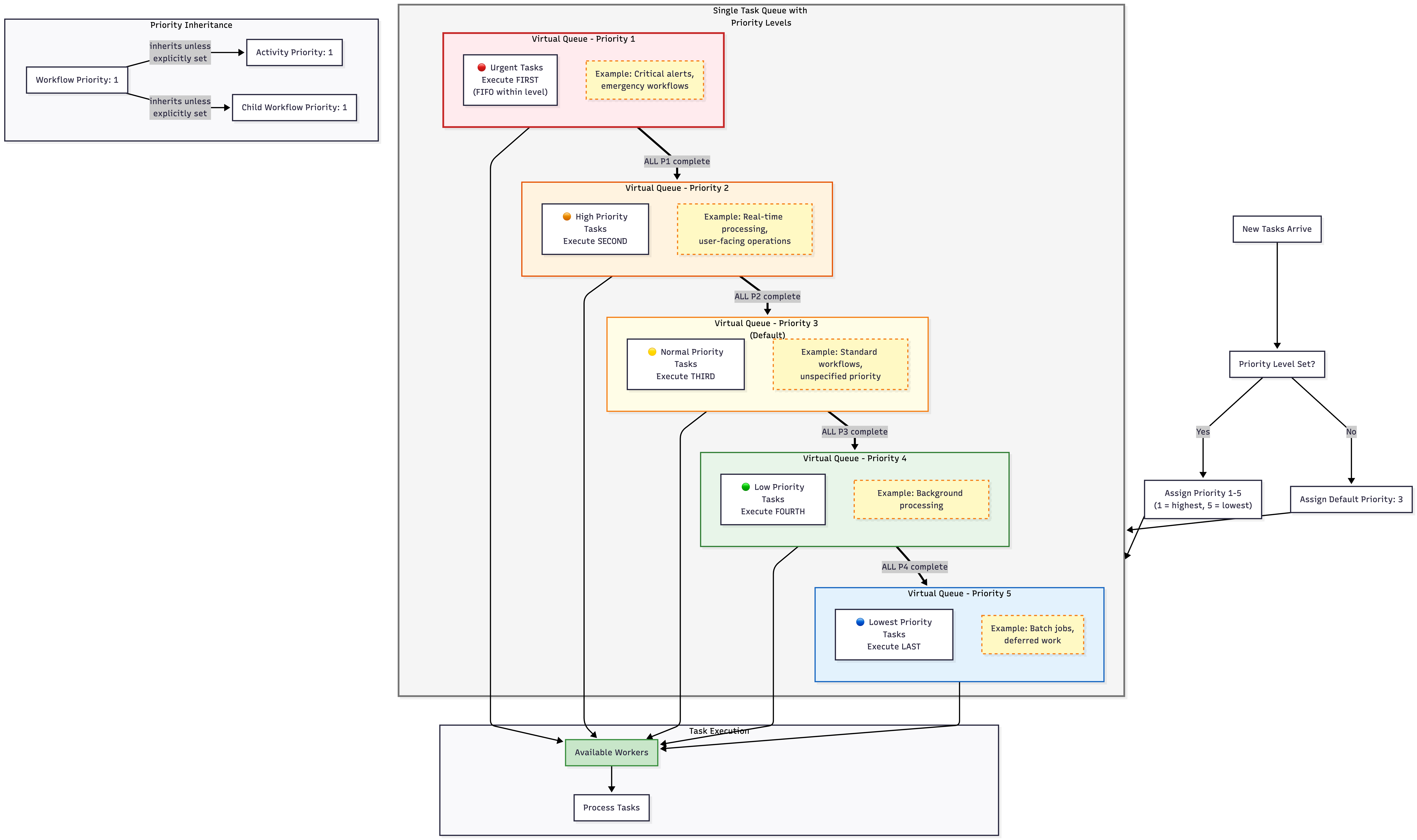
Detailed view of how Priority works
When to use Priority
If you need a way to specify the order your Tasks execute in, you can use Priority to manage that. Priority lets you differentiate between your Tasks, like batch and real-time Tasks, so that you can allocate resources more effectively. You can also use this as a way to run urgent Tasks immediately and override others. For example, if you are running an e-commerce platform, you may want to process payment related Tasks before less time-sensitive Tasks like internal inventory management.
How to use Priority
Priority is avaliable for both self-hosted Temporal instances and Temporal Cloud.
If you're self-hosting Temporal, use the latest pre-release development server and set matching.useNewMatcher to true in the dynamic config on the relevant Task Queues or Namespaces.
If you're using Temporal Cloud, contact Temporal Support or your Temporal account team to enable this feature for your cloud Namespaces.
You can select a priority level by setting the priority key to a value within the integer range [1,5]. A lower value implies higher priority, so 1 is the highest priority level. If you don't specify a Priority, a Task defaults to a Priority of 3. Activities will inherit the priority level of their Workflow if a separate Activity priority level isn't set.
When you set a priority level within your Task Queues, this means that they will all be processed in priority order. For example, all of your priority level 1 Tasks will execute before your priority level 2 Tasks and so on. So your lower priority Tasks will be blocked until the higher priority Tasks finish running. Tasks with the same priority level are scheduled to run in first-in-first-out (FIFO) order. If you need more flexibility to allocate resources to Tasks of the same type, like processing payments for multiple e-commerce platforms, check out the fairness section.
When you update priority levels, the Task Queues will only reflect these changes for Tasks that haven't dispatched yet, not Tasks that are already queued.
Sticky tasks ignore priority settings.
Choose your SDK below to see an example of setting priority for your Workflows:
workflowOptions := client.StartWorkflowOptions{
  ID:        "my-workflow-id",
  TaskQueue: "my-task-queue",
  Priority:  temporal.Priority{PriorityKey: 5},
}
we, err := c.ExecuteWorkflow(context.Background(), workflowOptions, MyWorkflow)
WorkflowOptions options = WorkflowOptions.newBuilder()
  .setTaskQueue("my-task-queue")
  .setPriority(Priority.newBuilder().setPriorityKey(5).build())
  .build();

WorkflowClient client = WorkflowClient.newInstance(service);
MyWorkflow workflow = client.newWorkflowStub(MyWorkflow.class, options);
workflow.run();
await client.start_workflow(
  MyWorkflow.run,
  args="hello",
  id="my-workflow-id",
  task_queue="my-task-queue",
  priority=Priority(priority_key=1),
)
var handle = await Client.StartWorkflowAsync(
  (MyWorkflow wf) => wf.RunAsync("hello"),
  new StartWorkflowOptions(
    id: "my-workflow-id",
    taskQueue: "my-task-queue"
  )
  {
    Priority = new Priority(1),
  }
);
Choose your SDK below to see an example of setting priority for your Activities:
ao := workflow.ActivityOptions{
  StartToCloseTimeout: time.Minute,
  Priority:            temporal.Priority{PriorityKey: 3},
}
ctx := workflow.WithActivityOptions(ctx, ao)
err := workflow.ExecuteActivity(ctx, MyActivity).Get(ctx, nil)
ActivityOptions options = ActivityOptions.newBuilder()
  .setStartToCloseTimeout(Duration.ofMinutes(1))
  .setPriority(Priority.newBuilder().setPriorityKey(3).build())
  .build();

MyActivity activity = Workflow.newActivityStub(MyActivity.class, options);
activity.perform();
await workflow.execute_activity(
  say_hello,
  "hi",
  priority=Priority(priority_key=3),
  start_to_close_timeout=timedelta(seconds=5),
)
await Workflow.ExecuteActivityAsync(
  () => SayHello("hi"),
    new()
    {
      StartToCloseTimeout = TimeSpan.FromSeconds(5),
      Priority = new(3),
    }
  );
Choose your SDK below to see an example of setting priority for your Child Workflows:
cwo := workflow.ChildWorkflowOptions{
  WorkflowID: "child-workflow-id",
  TaskQueue:  "child-task-queue",
  Priority:   temporal.Priority{PriorityKey: 1},
}
ctx := workflow.WithChildOptions(ctx, cwo)
err := workflow.ExecuteChildWorkflow(ctx, MyChildWorkflow).Get(ctx, nil)
ChildWorkflowOptions childOptions = ChildWorkflowOptions.newBuilder()
  .setTaskQueue("child-task-queue")
  .setWorkflowId("child-workflow-id")
  .setPriority(Priority.newBuilder().setPriorityKey(1).build())
  .build();

MyChildWorkflow child = Workflow.newChildWorkflowStub(MyChildWorkflow.class, childOptions);
child.run();
await workflow.execute_child_workflow(
  MyChildWorkflow.run,
  args="hello child",
  priority=Priority(priority_key=1),
)
await Workflow.ExecuteChildWorkflowAsync(
  (MyChildWorkflow wf) => wf.RunAsync("hello child"),
  new() { Priority = new(1) });
Task Queue Fairness
Task Queue Fairness lets you distribute Tasks based on fairness keys and their fairness weight within a Task Queue. The fairness keys are used to describe your Task structure. A fairness key can correspond to different tier levels, tenants, or other groupings useful to your workloads.
The Tasks associated with each fairness key are dispatched based on the fairness weight that has been assigned to the key. There should only be one fairness weight assigned to each fairness key within a single Task Queue. Having multiple fairness weights on a fairness key will result in unspecific behavior.
Using the fairness keys and their corresponding fairness weights lets you define levels with weighted capacities. For example, you can have free, basic, and premium levels and Fairness makes sure that an influx of premium Tasks don't overwhelm your resources and block free and basic Tasks.
For Pre-release, Fairness cannot be enabled for active Task Queues. The Task Queues have to be new or idle and there can't be any running Workflows. Once Fairness is enabled, all existing backlog Tasks in the Task Queue will be abandoned.
When to use Fairness
Say that you have three tenants, tenant-big, tenant-mid, tenant-small, that have varying numbers of Tasks at all times. Your tenant-big has a large number of Tasks that can overwhelm your Task Queue and prevent tenant-mid and tenant-small from running their Tasks. With Fairness, you can give each tenant a different fairness weight to make sure tenant-big doesn't use all of the Task Queue resources and block the others.
In this case, tenant-mid and tenant-small will have Tasks run in between tenant-big Tasks so that they are executed "fairly". Although, if all your Tasks can be dispatched immediately, then you don't need to use fairness.
This same scenario can apply to batch jobs where certain jobs run more often than others or processing orders from multiple vendors where several vendors have the majority of the orders.
Fairness applies at Task dispatch time based on information about the Tasks passing through the Task Queue and considers each Task as having equal cost. It doesn't consider any Task execution that is currently being done by Workers. So if you look at Tasks being processed by Workers, you might not see "fairness" across tenants.
There are two ways to use Task Queue Fairness: without Priority and with Priority.
Fairness without Priority
If you implement Fairness without Priority, Tasks with different fairness keys will use a weighted distribution based on the fairness weights to allocate resources in the Task Queue. For example, say you have three fairness keys to describe customer tiers: free-tier, basic-tier, and premium-tier. You give premium-tier a fairness weight of 5.0, basic-tier a fairness weight of 3.0, and free-tier a fairness weight of 2.0. With Fairness, that means 50% of the time premium-tier Tasks dispatch, 30% of the time basic-tier Tasks dispatch, and 20% of the time free-tier Tasks dispatch from the Task Queue backlog.
If there are Tasks in the Task Queue backlog that have the same fairness key, then they're dispatched in FIFO order.
This is how you are able to ensure that one tier doesn't use all the resources and block other Tasks in the Task Queue backlog from dispatching.
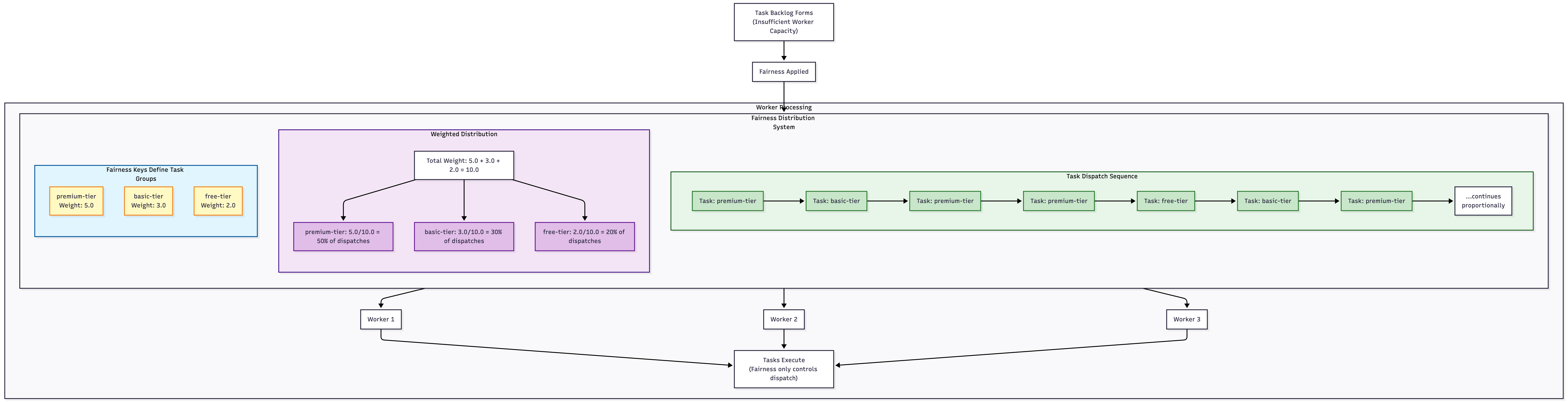
High-level of how priority and fairness work together
Fairness with Priority
When you use Fairness and Priority together, Priority determines which "bucket" Tasks go into. A single Task Queue with Priority implemented will have different "buckets" based on priority levels. Fairness will apply to the Tasks within each priority level. It sequences Tasks in the Task Queue probabilistically using a weighted distribution, like explained above, based on:
- Fairness weights you set
- The current backlog of Tasks
- A data structure that tracks how you've distributed Tasks for different fairness keys
It’s intended to address common situations like:
- Multi-tenant applications with big and small tenants where small tenants shouldn't be blocked by big ones.
- Assigning Tasks to different capacity bands and then, for example, dispatching 80% from one band and 20% from another without limiting overall capacity when one band is empty.
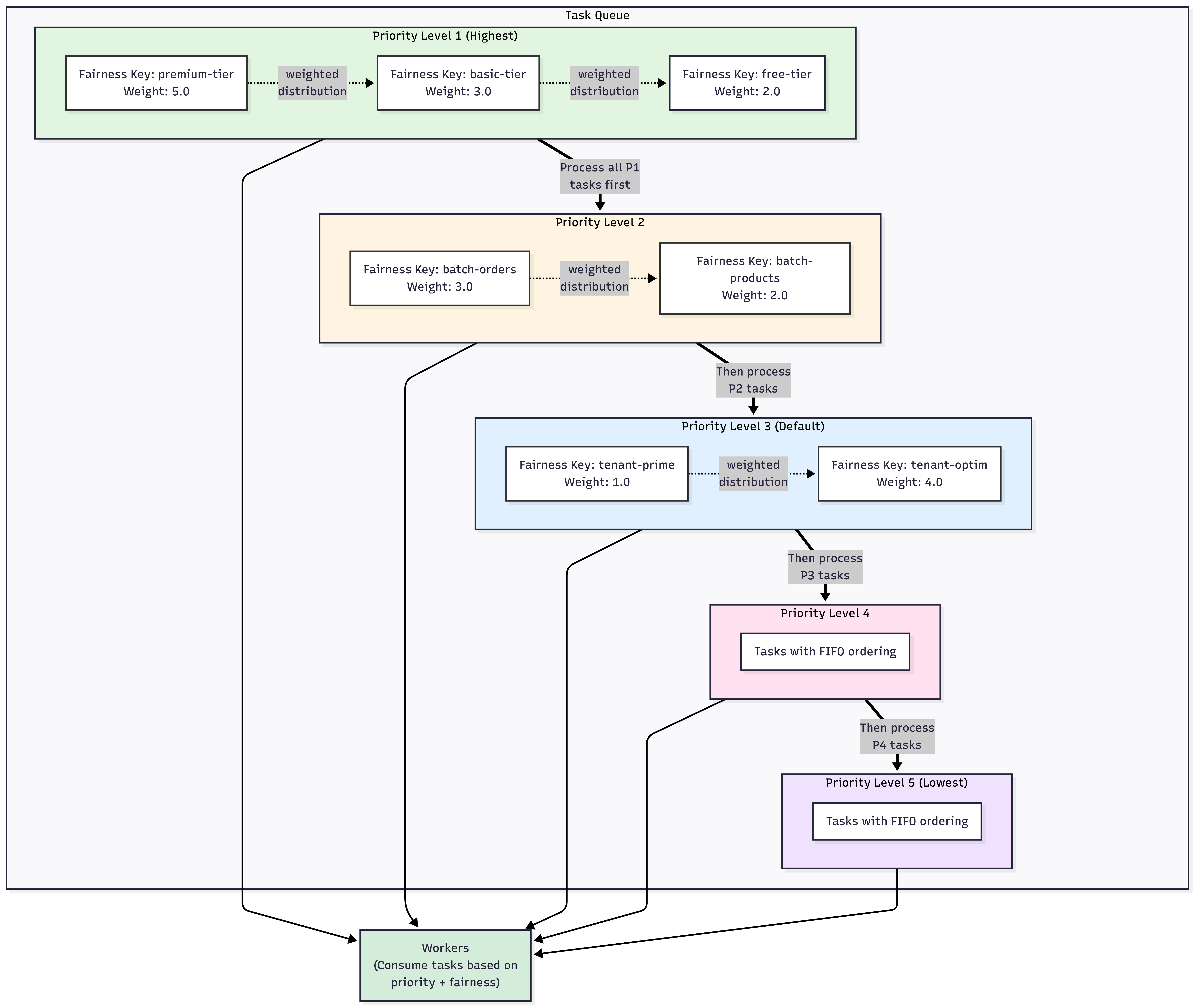
High-level of how priority and fairness work together
When you update fairness keys or fairness weights, the Task Queues will only reflect these changes for Tasks that haven't dispatched yet, not Tasks that are already queued.
How to use Fairness
Fairness is avaliable for both self-hosted Temporal instances and Temporal Cloud.
If you're self-hosting Temporal, use the latest pre-release development server and set matching.useNewMatcher and matching.enableFairness to true in the dynamic config on the relevant Task Queues or Namespaces.
Fairness is avaliable as a paid feature in Temporal Cloud, so contact Temporal Support or your Temporal account team to enable this feature for your cloud Namespaces. Fairness can be enabled or disabled at the Namespace level and billing will be disabled at the next calendar hour after it is disabled.
Enabling matching.useNewMatcher and matching.enableFairness is only applicable for self-hosted Temporal instances. There is a toggle coming to Temporal Cloud soon to enable Priority and Fairness at the Namespace level.
Choose your SDK below to see an example of setting fairness for your Workflows:
workflowOptions := client.StartWorkflowOptions{
  ID:        "my-workflow-id",
  TaskQueue: "my-task-queue",
  Priority:  temporal.Priority{
    PriorityKey:    1,
    FairnessKey:    "a-key",
    FairnessWeight: 3.14,
  },
}
we, err := c.ExecuteWorkflow(context.Background(), workflowOptions, MyWorkflow)
WorkflowOptions options = WorkflowOptions.newBuilder()
  .setTaskQueue("my-task-queue")
  .setPriority(Priority.newBuilder().setPriorityKey(5).setFairnessKey("a-key").setFairnessWeight(3.14).build())
  .build();
WorkflowClient client = WorkflowClient.newInstance(service);
MyWorkflow workflow = client.newWorkflowStub(MyWorkflow.class, options);
workflow.run();
await client.start_workflow(
  MyWorkflow.run,
  args="hello",
  id="my-workflow-id",
  task_queue="my-task-queue",
  priority=Priority(priority_key=3, fairness_key="a-key", fairness_weight=3.14),
)
const handle = await startWorkflow(workflows.priorityWorkflow, {
  args: [false, 1],
  priority: { priorityKey: 3, fairnessKey: 'a-key', fairnessWeight: 3.14 },
});
var handle = await Client.StartWorkflowAsync(
  (MyWorkflow wf) => wf.RunAsync("hello"),
  new StartWorkflowOptions(
    id: "my-workflow-id",
    taskQueue: "my-task-queue"
  )
  {
    Priority = new Priority(
      priorityKey: 3,
      fairnessKey: "a-key",
      fairnessWeight: 3.14
    )
  }
);
client.start_workflow(
  MyWorkflow, "input-arg",
  id: "my-workflow-id",
  task_queue: "my-task-queue",
  priority: Temporalio::Priority.new(
    priority_key: 3,
    fairness_key: "a-key",
    fairness_weight: 3.14
  )
)
Choose your SDK below to see an example of setting fairness for your Activities:
ao := workflow.ActivityOptions{
  Stardd
}
ctx := workflow.WithActivityOptions(ctx, ao)
err := workflow.ExecuteActivity(ctx, MyActivity).Get(ctx, nil)
ActivityOptions options = ActivityOptions.newBuilder()
  .setStartToCloseTimeout(Duration.ofMinutes(1))
  .setPriority(Priority.newBuilder().setPriorityKey(3).setFairnessKey("a-key").setFairnessWeight(3.14).build())
  .build();
MyActivity activity = Workflow.newActivityStub(MyActivity.class, options);
activity.perform();
await workflow.execute_activity(
  say_hello,
  "hi",
  priority=Priority(priority_key=3, fairness_key="a-key", fairness_weight=3.14),
  start_to_close_timeout=timedelta(seconds=5),
)
const handle = await startWorkflow(workflows.priorityWorkflow, {
  args: [false, 1],
  priority: { priorityKey: 3, fairnessKey: 'a-key', fairnessWeight: 3.14 },
});
var handle = await Client.StartWorkflowAsync(
  (MyWorkflow wf) => wf.RunAsync("hello"),
  new StartWorkflowOptions(
    id: "my-workflow-id",
    taskQueue: "my-task-queue"
  )
  {
    Priority = new Priority(
      priorityKey: 3,
      fairnessKey: "a-key",
      fairnessWeight: 3.14
    )
  }
);
client.start_activity(
  MyActivity, "input-arg",
  id: "my-workflow-id",
  task_queue: "my-task-queue",
  priority: Temporalio::Priority.new(
    priority_key: 3,
    fairness_key: "a-key",
    fairness_weight: 3.14
  )
)
Choose your SDK below to see an example of setting fairness for your Child Workflows:
cwo := workflow.ChildWorkflowOptions{
  WorkflowID: "child-workflow-id",
  TaskQueue:  "child-task-queue",
  Priority:   temporal.Priority{
    PriorityKey:    1,
    FairnessKey:    "a-key",
    FairnessWeight: 3.14,
  },
}
ctx := workflow.WithChildOptions(ctx, cwo)
err := workflow.ExecuteChildWorkflow(ctx, MyChildWorkflow).Get(ctx, nil)
ChildWorkflowOptions childOptions = ChildWorkflowOptions.newBuilder()
  .setTaskQueue("child-task-queue")
  .setWorkflowId("child-workflow-id")
  .setPriority(Priority.newBuilder().setPriorityKey(1).setFairnessKey("a-key").setFairnessWeight(3.14).build())
  .build();
MyChildWorkflow child = Workflow.newChildWorkflowStub(MyChildWorkflow.class, childOptions);
child.run();
await workflow.execute_child_workflow(
  MyChildWorkflow.run,
  args="hello child",
  priority=Priority(priority_key=3, fairness_key="a-key", fairness_weight=3.14),
)
const handle = await startChildWorkflow(workflows.priorityWorkflow, {
  args: [false, 1],
  priority: { priorityKey: 3, fairnessKey: 'a-key', fairnessWeight: 3.14 },
});
var handle = await Client.StartWorkflowAsync(
  (MyWorkflow wf) => wf.RunAsync("hello"),
  new StartWorkflowOptions(
    id: "my-workflow-id",
    taskQueue: "my-task-queue"
  )
  {
    Priority = new Priority(
      priorityKey: 3,
      fairnessKey: "a-key",
      fairnessWeight: 3.14
    )
  }
);
client.start_child_workflow(
  MyChildWorkflow, "input-arg",
  id: "my-child-workflow-id",
  task_queue: "my-task-queue",
  priority: Temporalio::Priority.new(
    priority_key: 3,
    fairness_key: "a-key",
    fairness_weight: 3.14
  )
)
Limitations of fairness
When you use Worker Versioning and you're moving Workflows from one version to another, the ordering of Workflow Tasks that are moved to the next version is undefined. Tasks redirected to a new Worker version may not be treated fairly with respect to each other or Tasks that aren't redirected.
There isn't a limit on the number of fairness keys you can use, but their accuracy can degrade as you add more.
Task Queues are internally partitioned and Tasks are distributed to partitions randomly. This could interfer with fairnesss. Depending on your use case, you can reach out to Temporal Support to get your Task Queues set to a single partition.